Automatically detect and cut silent pauses from talking head videos, podcasts, and tutorials. Save hours of editing time.
14-day money-back guarantee · One-time purchase
Currently available for macOS only. Windows coming soon.
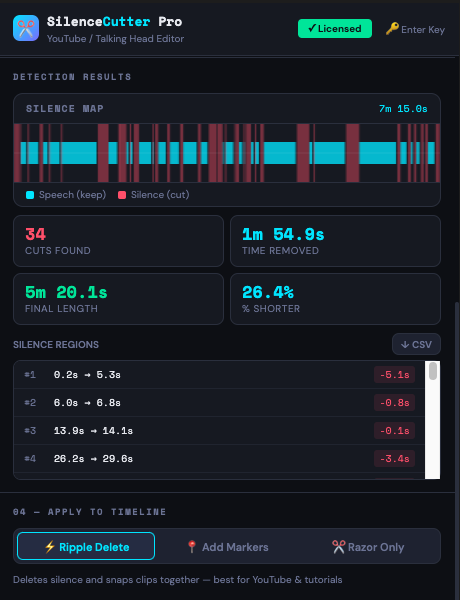
A visual silence map, region-by-region breakdown, and exact timestamps — so you know exactly what's being removed before you apply it to the timeline.
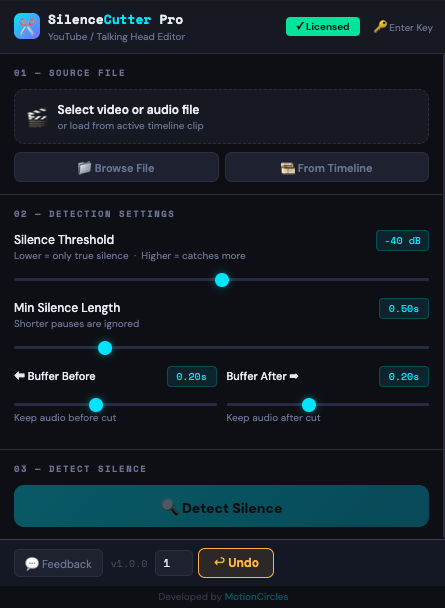
RMS-based audio analysis detects silence with adjustable threshold, minimum duration, and padding controls.
Ripple delete all silence at once. Creates a clean cut sequence with gaps closed automatically.
Video and audio tracks stay perfectly aligned. No sync drift, no mismatched cuts.
Runs entirely inside Premiere Pro. No cloud uploads, no external servers, no waiting.
Preview before cutting — add markers at each silence region and review in your timeline first.
Fine-tune threshold, minimum silence length, and start/end padding to get exactly the cuts you want.
Click 'From Timeline' to load your active sequence's clips for analysis.
Adjust your threshold and hit detect. See every silence region highlighted instantly.
One click removes all silence and closes the gaps. Your tighter edit is ready.
No subscription, no recurring fees. Pay once and keep it.
Secure checkout via Stripe · Cancel anytime within 14 days for a full refund